
Introducing Pulsar Workspaces: A new foundation for enterprise insights teams

Enterprise social intelligence teams have evolved. They’re no longer a handful of analysts running ad-hoc analysis on isolated datasets. Today, they’re large, distributed teams spanning regions, brands, agencies, and functions, all expected to collaborate, move fast, and operate with clarity and control.
But while the scale of insight work has grown, the structure of the tools supporting it often hasn’t.
That’s why we’re introducing Pulsar Workspaces.
From search directories to system of insight
For a long time, social listening and audience intelligence tools have treated Searches as isolated objects, created by individuals, listed in flat catalogues, and shared one by one.
That approach breaks down quickly when you’re dealing with:
- Dozens of markets
- Multiple agencies and internal teams
- Hundreds (or thousands) of active searches
- Varying permission and governance requirements
Flat lists don’t scale. Workspaces do.
Pulsar Workspaces represent a shift from managing individual searches to operating a structured system of insight — designed for enterprise and global teams by default.
What is a Pulsar Workspace?
A Workspace is a structured environment where teams can:
- Organize searches by project, client, market, or function
- Share work at a team level instead of one search at a time
- Apply ownership, access control, and clear responsibility
- Collaborate without clutter or confusion
Think of Workspaces as the organizational layer that enterprise insight teams have been missing, bringing the same discipline to insight operations that modern organizations expect from their cloud, data, and analytics stacks.
"As enterprise insight teams scale globally, the tools they use must evolve from simple catalogues of individual datasets into structured systems of insight", said Francesco D’Orazio, CEO of Pulsar.
Workspaces is your hub for structuring collaboration, managing settings and permissions, and to quickly find what you’re looking for across all the TRAC searches and users.
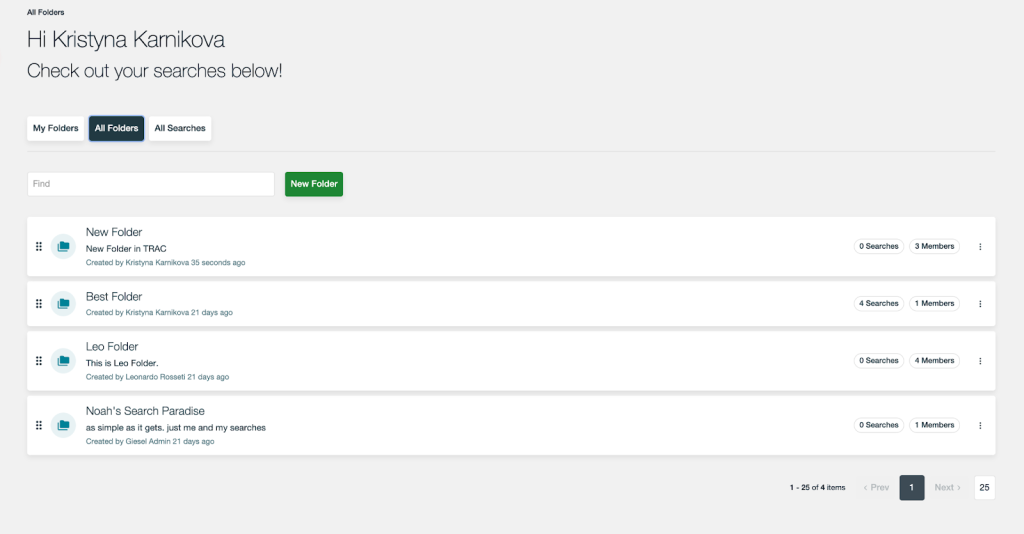
And we’re kicking off the rollout of Workspaces with Search Folders – a flexible and intuitive setup to foster collaboration, security, and focus across all your searches. Search Folders make it easier to find, manage, and maintain related searches, especially for teams working across multiple initiatives or regions.
Using this new feature, you can :
- Create and organize searches into folders: Users can now create folders and group their searches in a way that mirrors how they work – whether that’s by project, client, team, region or something else.
- Choose between Public or Private folders: Users have the option to organise their work into either public folders or private folders – organizing a workspace for easier navigation, or creating the privacy with which to work on sensitive or confidential projects.
- Share entire folders across teams: It’s now easy to group related searches – from brand trackers, to trend analytics, to campaign measurement – and share access or permissions with collaborators in one click.
If you’re interested in learning more about Workspaces, simply fill in the form below and we’ll follow up.
As always, we’re building this in close partnership with our customers, and your feedback will help shape what comes next.
This article was created using data from TRAC